


Placing puppies into the right homes is one of the most important parts of responsible breeding. Dogz Online provides a range of tools to help breeders connect with the right families, manage enquiries efficiently, and keep everything organised in one place.
We’ve put together a practical guide on how to get the most out of Dogz Online when placing puppies.
1. Add a Photo Carousel to Your Member Profile
A well-presented profile makes a big difference when puppy buyers are browsing breeder listings and puppy listings. Dogz Online allows you to add a photo carousel to the top of your member profile, giving buyers an immediate visual introduction to your dogs and breeding program.
Member's like JOHGRA, HUNTINGDOWNS, KEZZIAH have great carousel photos that showcase their dogs when puppy buyers first visit their profiles.
Photo Tips:
- Use high-quality photos of your puppies and/or dogs
- Upload a minimum of 5 photos to activate the carousel
- Choose images that represent your breed, your dogs, and your breeding program well
Where to add photos?
- Go to your Breeder Listings in the Member's Section
- Select "Manage Photos"
- Upload 5 or more photos
Members who upload a photo carousel have a 46% higher chance of receiving enquiries than member's who limited photos.
2. Turn on Puppy Applications
One of the most powerful tools on Dogz Online is Puppy Applications. Applications allow you to gather key information about potential owners before starting conversations.
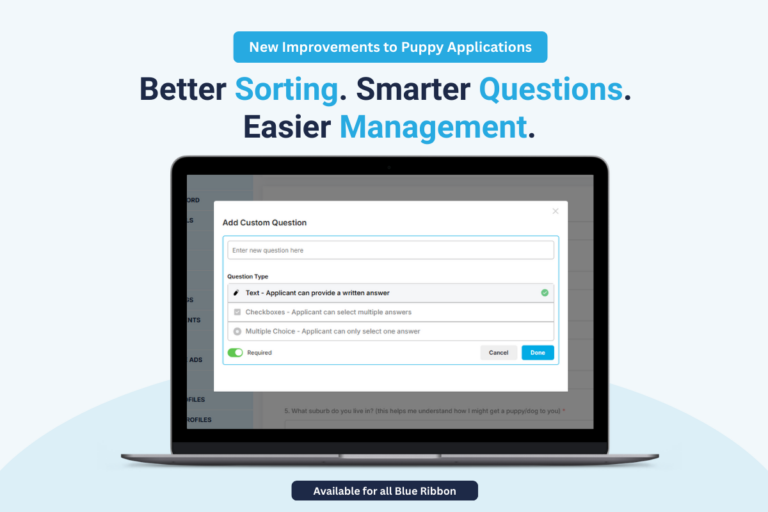
You can also customise your puppy application to include questions that you screen for in puppy homes.
With the latest upgrades, you can now:
- Categorise applicants as Favourites or Unlikely
- Approve or update multiple applications at once
- Send bulk responses to applicants
- Archive old applications for better organisation
These features help you quickly identify the most suitable homes and streamline the entire placement process.
How to turn on Puppy Applications:
- Go to the Applications area in your Member’s Section
- Look for “Turn On/Off Applications”
- Ensure the toggle is green for the breed you would like to receive applications for
- Select Save
8 in 10 buyers prefer to submit a puppy application first, as it helps them introduce themselves better, making it one of the most effective ways for buyers to express interest in a puppy.
The Puppy Applications tool is also a great way to build your waitlist and EOI list for future litters.
Need a visual? Watch our video guide here
3. Attempt to respond to messages and enquiries in 1-2 days
We know life, and managing dogs, can get busy. However, it’s especially important to try to respond to enquiries on Dogz Online within 1–2 days.
When a buyer sends you a message through Dogz Online, you’ll receive an email notification straight away, so you know when a new enquiry has come through.
By replying through Dogz Online, it also helps keep all conversations in one place, making it easier to manage enquiries and keep track of interested buyers.
Responding promptly shows buyers that you’re engaged and approachable, and it helps maintain momentum with genuine applicants looking for a puppy.
4. Keep Your Next Planned Litter Updated
If you don’t currently have puppies available, you can update your Next Planned Litter on Dogz Online so buyers know when you expect to have puppies in the future.
This helps buyers understand availability and plan ahead. We will also soon be introducing features that allow buyers to filter by upcoming litters, making it even easier for them to find breeders planning future litters.
How to update your Next Planned Litter:
- Go to your Breeder Listings in the Member’s Section
- Edit the listing
- Go to Next Planned Litter and select the relevant month
- Process your changes at the bottom of the page
Keeping this updated helps keep buyer interest active and allows you to start building a waitlist for upcoming litters.
5. Add Photos to Your “Past Litters” Gallery
- Go to your breeder listings area
- Click Edit Listing
- At the bottom you will see "Manage Your Past Litters Gallery"
- Click Select Files, and upload your images
- Save and Process Your Changes
6. When You Home A Puppy, Add them to your My Owners List
Dogz Online provides a My Owners List feature that helps breeders manage puppy placements and keep records organised in one place.
Using this feature allows you to maintain a simple record of where your puppies go and keep important owner details easily accessible.
With My Owners List, you can:
- Add puppy buyers directly from applications
- Store contact details, litter IDs, and puppy information
- Keep notes and records for each owner
How to add an owner:
- Go to My Owners List in your Member’s Section
- Add owners manually and fill out their details, OR
- Add them directly from your Puppy Applications
This creates a convenient dashboard for tracking puppy placements and maintaining organised breeder records.
Watch our video guide on the My Owners List
7. Use Dogz Pay for Secure Puppy Payments
Dogz Online also provides Dogz Pay, a secure way to request and receive puppy payments directly through the platform.
With Dogz Pay You Can:
- Enjoy chargeback protection from fraudulent buyers, once funds reach you, they cannot be reversed
- Accept bank account payments with lower processing fees
- Still offer card payments for buyers who prefer that option
- Use a secure payment platform designed to help prevent scams
- Give both buyers and breeders confidence when organising payments
Dogz Pay helps remove the risks associated with sharing bank details or handling cash, while giving both breeders and buyers added protection.
It is also a great tool to protect you from fraudulent buyers, international payments, or where you feel you need the additional peace of mind. We guarantee payments to you, and ensure you receive your funds.